
Introduction
In today’s fast‑paced design world, homeowners, real‑estate agents, and marketers alike are constantly searching for tools that can turn a simple snapshot of a space into a compelling visual story. Traditional interior‑design workflows often involve costly consultations, time‑intensive mood boards, and painstaking 3D modeling. Quick Dreamviz arrives as a modern answer to these challenges, offering an AI‑driven, browser‑based platform that can generate photorealistic room redesigns in seconds.
Whether you are a DIY enthusiast looking to experiment with color palettes, a freelancer needing quick mock‑ups for client presentations, or a property manager aiming to showcase staged homes without hiring a photographer, this tool promises speed, flexibility, and affordability. In this review we’ll explore the core capabilities, walk through the user journey from upload to export, assess system compatibility, and weigh the advantages against potential drawbacks. By the end, you’ll have a clear picture of whether Quick Dreamviz fits into your design toolkit and how to get the most out of its free tier and credit‑based pricing model.
Overview
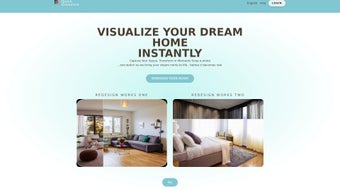
Quick Dreamviz is an AI‑powered web application that transforms a single photograph of a room into a fully rendered design concept within seconds. Users start by uploading a clear, well‑lit image, then select the room type—living room, kitchen, bedroom, office, or bathroom—and choose from a curated library of design themes such as Modern, Minimalist, Vintage, Scandinavian, Industrial, and many more. The platform instantly generates a realistic visual that reflects lighting, textures, and perspective, allowing users to see how new furniture, color schemes, or layout changes would look in their actual space.
The service operates on a credit‑based model: a free tier provides a limited number of renders each month, while paid credits unlock higher‑resolution outputs, priority processing, and advanced features like API access. Because all rendering is performed on secure cloud servers, there is no need for local hardware acceleration, making the tool accessible from any modern browser on Windows, macOS, Android, or iOS. Quick Dreamviz also emphasizes privacy, encrypting images during upload and automatically deleting them after rendering.
The combination of speed, cross‑platform accessibility, and a diverse style library positions Quick Dreamviz as a valuable resource for anyone who wants to experiment with interior design without the overhead of traditional software or professional services.
Features & Benefits
- AI‑Generated Renderings: Deep‑learning models produce photorealistic images that match the original lighting, texture, and perspective.
- Extensive Design Themes: Over 20 curated styles, from Modern to Industrial, each pre‑populated with furniture and color palettes.
- Rapid Turnaround: Average rendering time of 15‑30 seconds, enabling quick iteration and decision‑making.
- Web‑Based Access: No downloads required; runs on any browser, ensuring seamless cross‑platform compatibility.
- Flexible Credit System: Free tier offers 5 monthly renders; paid credits start at $9.99 for 50 credits, with bulk discounts.
- Secure Cloud Processing: End‑to‑end encryption and automatic deletion of source images after rendering.
- Multiple Export Options: Download renders in JPG or PNG, share via a unique link, or embed directly into presentations.
- User‑Friendly Interface: Drag‑and‑drop upload, intuitive dropdown menus, and real‑time progress indicators.
- Post‑Render Editing: Swap furniture, adjust wall colors, or tweak lighting without consuming additional credits.
- API Integration: Premium users can connect Quick Dreamviz to real‑estate platforms for automated staging.
Beyond the listed capabilities, Quick Dreamviz continuously updates its AI models with the latest design trends, ensuring that generated visuals stay current without manual user intervention. The credit system encourages mindful usage, allowing occasional hobbyists to benefit from the free tier while providing a scalable path for professionals who require frequent high‑resolution renders. Moreover, the platform’s API opens opportunities for developers to embed automatic room staging into websites, enhancing property listings with dynamic visuals that can boost engagement and conversion rates. Overall, these features combine to create a tool that not only saves time and money but also expands creative possibilities for a wide audience.
Installation, Usage & Compatibility
Zero‑Installation Setup
Quick Dreamviz is a pure cloud service, meaning the only step required to start is opening a web browser and navigating to quickdreamviz.com. The site automatically detects your operating system and optimizes the interface for performance. For users who prefer a desktop‑like experience, most browsers allow you to create a shortcut or “Add to Home screen,” providing quick access without occupying disk space.
Step‑by‑Step Workflow
- Upload a Photo: Choose a high‑resolution image (minimum 1080p recommended) of the room you wish to redesign.
- Select Room Type: Use the dropdown menu to specify the functional layout (living room, kitchen, etc.).
- Pick a Design Theme: Browse the visual gallery and select a style that matches your vision.
- Generate Render: Click “Generate” and watch the progress bar; a realistic preview appears in under 30 seconds.
- Refine as Needed: Utilize “Swap Furniture” or “Adjust Color” tools for minor tweaks without using extra credits.
- Export or Share: Download the final image, copy a shareable link, or export a PDF report with before/after comparisons.
Supported Operating Systems
Because rendering occurs on Quick Dreamviz’s servers, the application works on any device with a modern browser:
- Windows 10/11: Chrome, Edge, Firefox, Opera – full feature set.
- macOS Catalina and later: Safari, Chrome, Firefox – seamless performance.
- Android 8.0+: Chrome or native WebView – responsive UI.
- iOS 13+: Safari or Chrome – touch‑optimized controls.
Device hardware influences only upload speed and UI responsiveness; the quality and speed of AI rendering remain consistent across platforms, making Quick Dreamviz a reliable choice even on older laptops or tablets with a stable internet connection.
Pros, Cons, FAQ & Conclusion
Pros
- Instant, photorealistic renders dramatically cut design decision time.
- Completely web‑based; no installation needed, works on Windows, macOS, Android, and iOS.
- Extensive library of design themes keeps results fresh and on‑trend.
- Secure cloud processing with encryption protects user privacy.
- Flexible credit system provides a generous free tier for casual users.
Cons
- Requires a clear, well‑lit source image; low‑quality photos produce subpar results.
- Credit‑based pricing can become costly for frequent high‑resolution renders.
- Limited fine‑grained control over individual furniture pieces; best suited for overall style.
- No offline mode; an internet connection is mandatory.
- Advanced features such as API access and batch processing are locked behind higher‑tier plans.
Frequently Asked Questions
Do I need to create an account to use Quick Dreamviz?
You can generate a limited number of free renders without an account, but creating a profile lets you track credits, save favorite styles, and access premium features.
What image formats are supported for upload?
JPEG, PNG, and HEIC files are accepted. For best results, use a JPEG or PNG with a resolution of at least 1080p.
Can I edit the rendered design after it’s generated?
Yes. Quick Dreamviz offers post‑render tweaks such as swapping furniture items, adjusting wall colors, and changing lighting intensity without spending additional credits.
Is there a mobile app for Quick Dreamviz?
Currently the service is web‑only, but the responsive design works flawlessly on smartphones and tablets, giving an app‑like experience.
How does the credit system work?
Each render consumes a set number of credits based on resolution and priority. Free users receive 5 credits per month; paid packages start at 50 credits for $9.99, with discounts for bulk purchases.
Conclusion – Should You Download Quick Dreamviz?
Quick Dreamviz delivers on its promise of instant, AI‑powered home visualization. Its browser‑based architecture, rapid rendering times, and expansive style library make it a practical choice for homeowners, designers, and marketing professionals alike. While the need for high‑quality source images and the credit‑based pricing model may pose minor hurdles, the overall value—especially the ability to experiment with multiple design concepts without committing to expensive renovations—far outweighs these limitations. If you’re looking to preview a modern living‑room makeover, test a minimalist bedroom palette, or generate polished visuals for a client pitch, Quick Dreamviz provides a secure, up‑to‑date solution that works across Windows, macOS, Android, and iOS. Download Quick Dreamviz today and start turning your design ideas into vivid, shareable reality.



.png)



